Diablo III Rendering
How are the graphics engines of world-famous games built? What technologies do developers at the largest game companies use? Is it really necessary to employ the most cutting-edge techniques of modern 3D graphics to create beautiful visuals? We'll try to answer these questions by examining the rendering subsystem of Diablo III from Blizzard Entertainment.
I've worked in game development for a long time, and one of my hobbies is reverse-engineering the graphics engines of popular games. When the long-awaited sequel to the Diablo series was released, I immediately wanted to find out what technologies the developers had used in their creation.
The renderer is built on top of Direct3D 9. This allows the game to support a broader range of graphics hardware. The advanced features offered by Direct3D 10 and 11 are often either unnecessary or can be implemented in one way or another using Direct3D 9.
Shadows
Precomputed lightmaps are used for all static level geometry. Yes, the good old technique that's been around ever since 3D accelerators started supporting multitexturing.
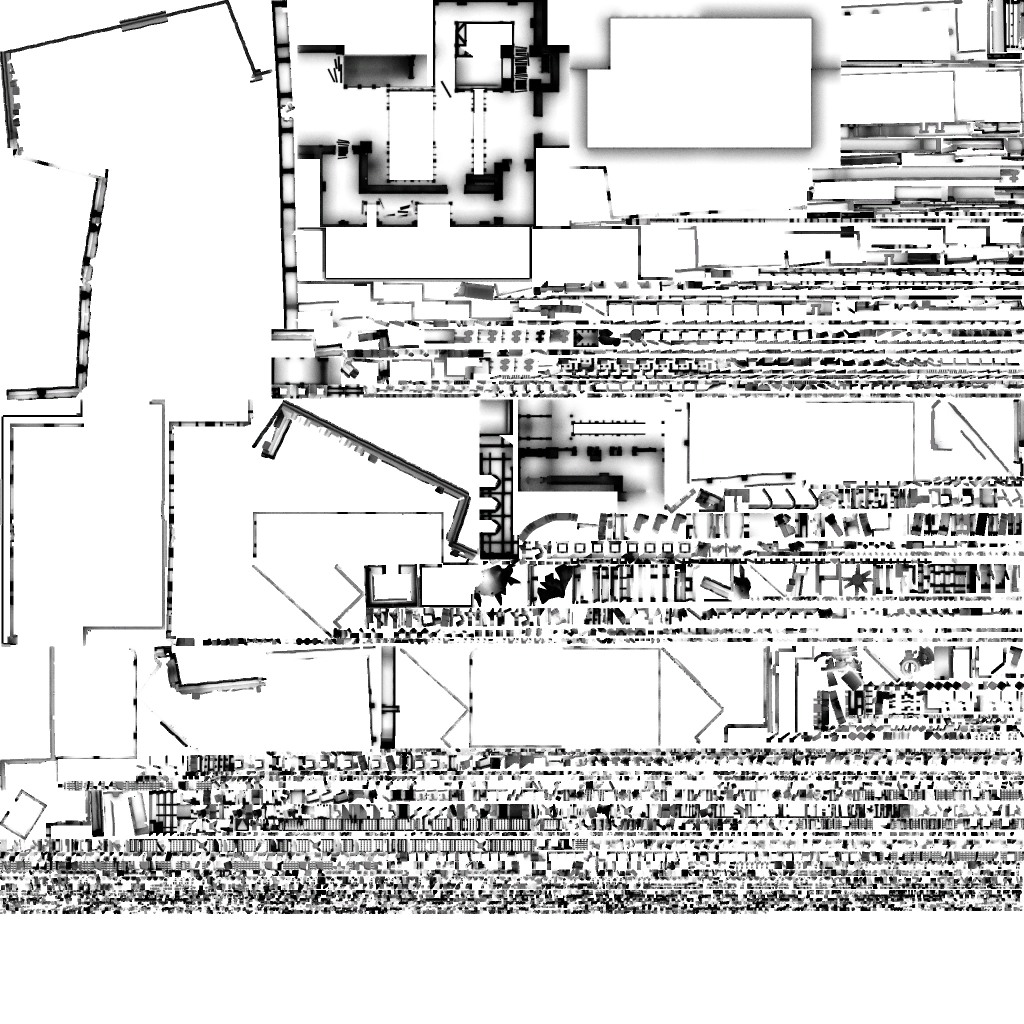
The lightmap is generated beforehand either in a 3D content creation package (3ds Max, Maya) or using a custom ray tracer inside the level editor. A single lightmap texture is shared between multiple game objects, or between multiple parts of a large object such as terrain.
For dynamic objects (monsters and player characters), dynamic shadows based on the shadow map technique are used. (Stencil shadows are practically extinct nowadays.) The developers departed from the conventional approach and chose not to use hardware shadow maps. That is, they do not use depth textures with built-in Percentage Closer Filtering (PCF) provided by all major GPU vendors. Instead, they implemented Variance Shadow Maps (VSM). This technique allows soft shadow edges to be produced through ordinary image blurring. With traditional shadow maps, blurring depth values is meaningless, so this approach is not possible. I won't go into the details of VSM here (see the useful links at the end of the article). I'll simply note that the algorithm requires storing two values:
- depth
- depth squared
The second value places fairly strict requirements on storage precision. As a result, a texture of format:
A32B32G32R32F
was chosen. At maximum shadow quality, its resolution is:
2048 × 2048
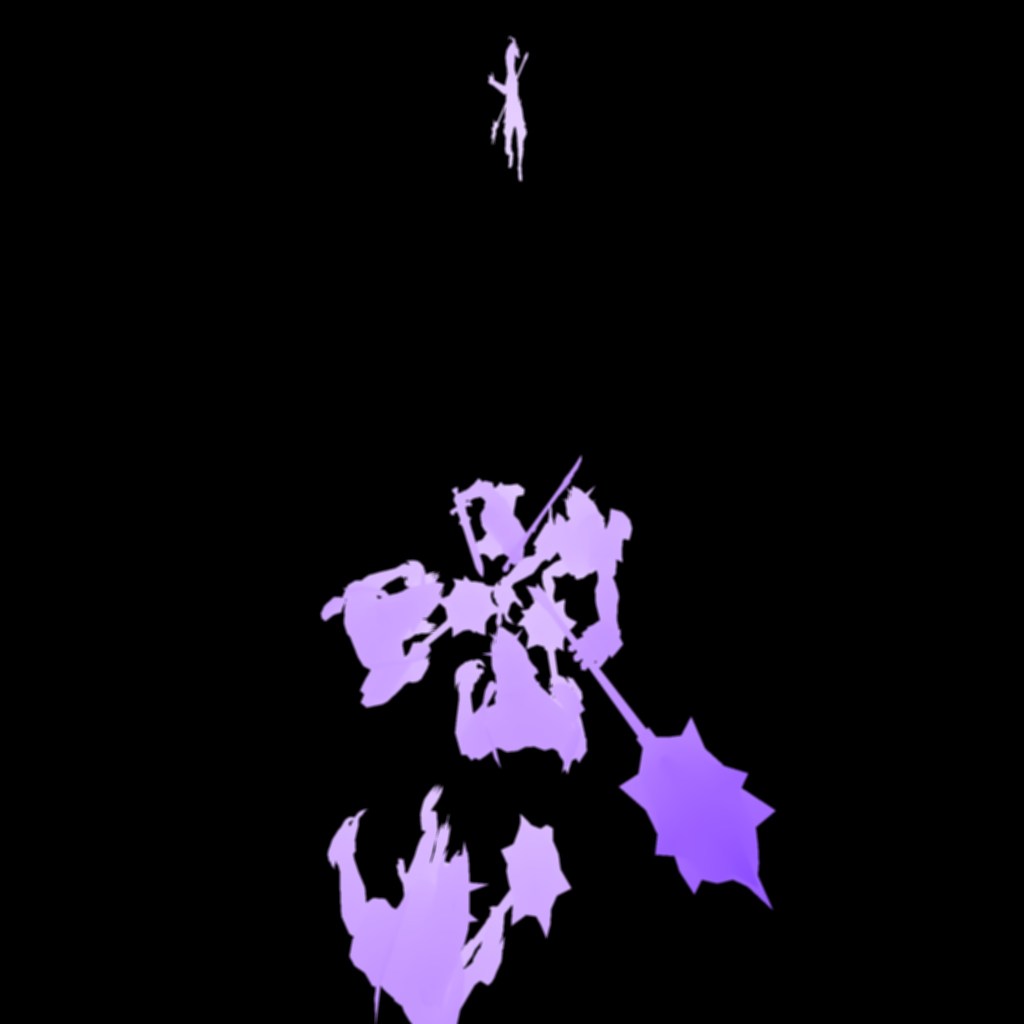
Shadow-map generation itself is entirely standard. All shadow casters are rendered into the shadow map from the point of view of the light source. The shadow texture is then blurred horizontally and vertically. When rendering shadow receivers, the shadow map is sampled to determine illumination visibility, and the final pixel color is darkened accordingly. Shadow-map sampling must use bilinear filtering. Hardware filtering of A32B32G32R32F textures is not supported by all Shader Model 3.0 GPUs. Therefore Blizzard implemented the filtering manually inside the shader. (My own graphics card supports it, but the renderer doesn't rely on that.)
Shadow rendering uses:
- orthographic projection for directional lights (sunlight)
- perspective projection for spotlights
Perspective shadow-map warping techniques such as:
- Perspective Shadow Maps (PSM)
- Trapezoidal Shadow Maps (TSM)
are unnecessary for Diablo's camera angle and therefore are not used. The same applies to:
- Cascaded Shadow Maps (CSM)
- Parallel Split Shadow Maps (PSSM)
Since the game camera always looks downward from above at a relatively small angle to the primary light direction, the benefits of those techniques would be minimal. Shadow map at 512×512 resolution, with and without filtering:
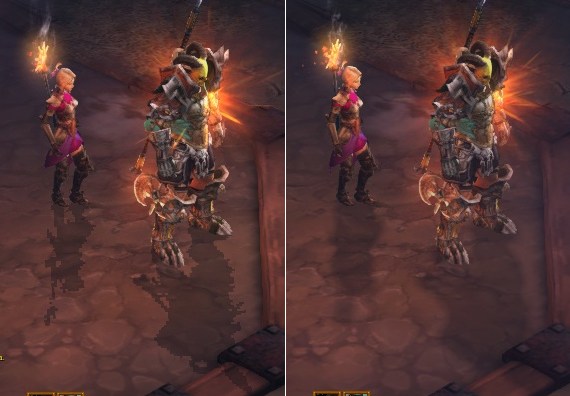
The terrain-patch shader contains:
With filtering:
12 texture instructions
59 arithmetic instructions
Without filtering:
10 texture instructions
29 arithmetic instructions
The extra arithmetic instructions implement bilinear filtering and VSM evaluation.
Dynamic Lighting
Surprisingly, all dynamic lighting is performed per-vertex. Just like in the good old days. There are no normal maps in the game. A bold decision. Judging by the final result, however, it was absolutely the right one. The lack of geometric detail is never noticeable. The vertex shader implements:
- one point light with quadratic attenuation (similar to classic FFP formulas),
- one cylindrical light source (used as character fill lighting),
- up to sixteen point lights with simple linear attenuation.
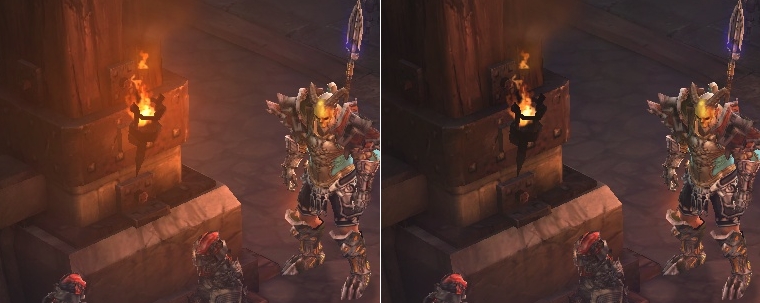
Volumetric light sources are also present in the game. They are implemented as follows. A sphere (or another convex shape) is rendered at the position of the light source. In the vertex shader, vertex alpha is computed based on the angle between the surface normal and the camera direction. The larger the angle, the greater the transparency. The result is a semi-transparent sphere whose opacity decreases from the center toward the edges. Since this sphere intersects with level geometry, visible artifacts would normally appear at the intersection points. This issue is solved using exactly the same technique employed by so-called soft particles. A sample is taken from the depth buffer and compared with the depth of the pixel currently being rendered. If the values are close, alpha is reduced toward zero, making the intersection invisible.
Special Effects
One particularly interesting effect is projective texturing. To project gameplay effects onto the ground (Barbarian shouts, poison pools, monster fire trails, and so on), all such effects are first rendered into a separate texture:
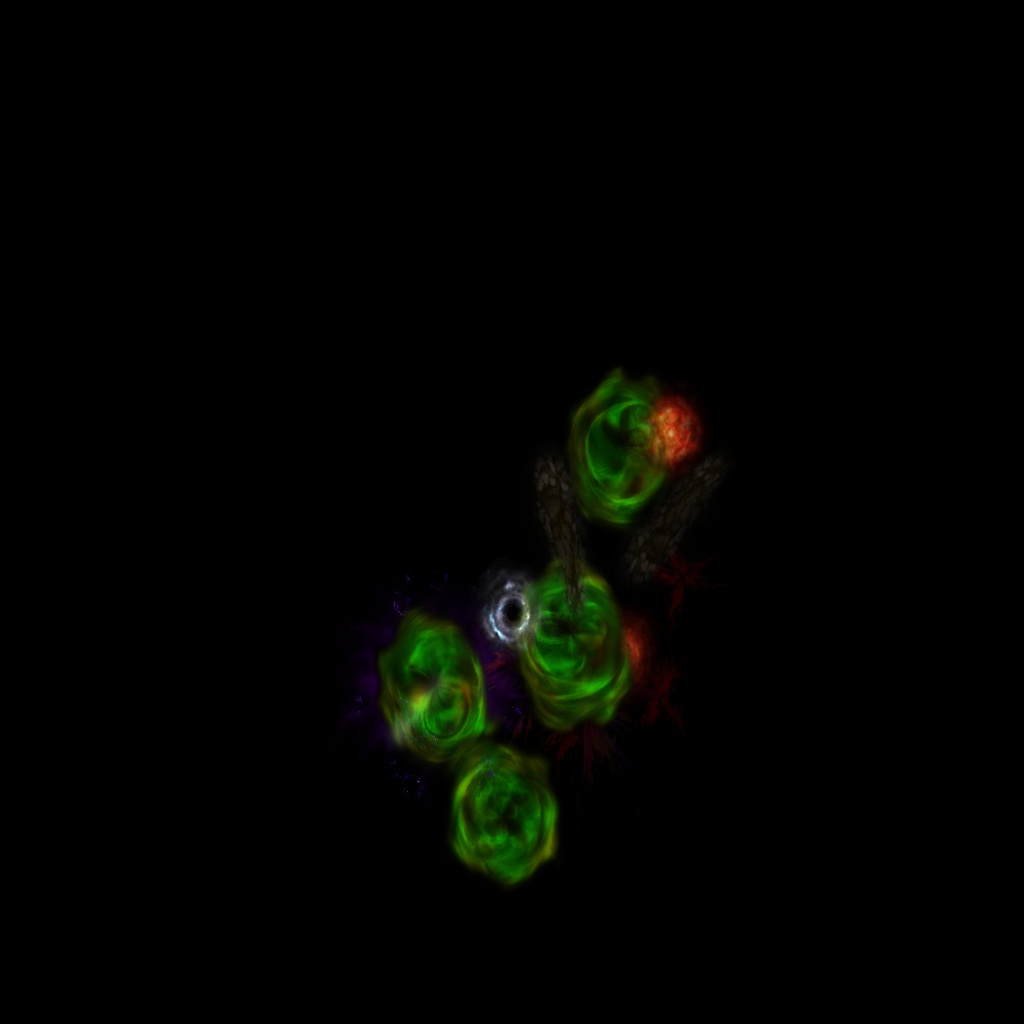
The geometry that should receive the projected effects is then rendered again using this accumulated projection texture. Image blending is performed using the alpha channel.
Some effects (particularly post-processing effects) require access to scene depth information. Standard Direct3D 9 functionality does not allow reading the depth buffer directly as a texture. The obvious solution would be to render the entire scene again while outputting depth values into an R32F texture. In most situations this is unacceptable because it doubles geometry rendering cost and significantly impacts performance. GPU vendors have long been aware of this problem and introduced special texture formats that can function both as render-time depth buffers and as shader-readable textures. One such format is the well-known INTZ format. That is exactly what Diablo III uses. An INTZ texture acts as the scene depth buffer during rendering and can later be sampled from shaders whenever depth information is required. I don't know how rendering works on hardware that doesn't support INTZ textures. (Not every Shader Model 3.0 GPU supports this "hack".) I don't own such a card, so I couldn't test it. Possible options include:
- an additional depth-rendering pass,
- alternative implementations of depth-dependent effects,
- disabling those effects entirely.
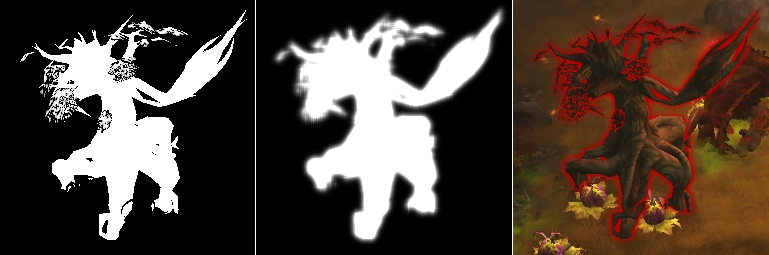
Object highlighting is implemented by rendering the selected object into a separate texture. The shader used is extremely simple:
- output 1 into the alpha channel,
- output the highlight color into RGB.
The resulting texture is then blurred horizontally and vertically. To create the final outline effect correctly, only the halo surrounding the object should remain visible. The object's original silhouette must disappear. Because the renderer still has access to the original (non-blurred) image, the final compositing shader can compare alpha values. If alpha equals 1:
The object exists in this pixel.
Output alpha = 0.
If alpha equals 0:
No object exists in this pixel.
Use the blurred texture's alpha.
The result:
Post-Processing Effects
The game cannot boast a huge collection of post-processing effects. Among the available arsenal, I observed:
- Bloom
- Full-screen distortion
- FXAA anti-aliasing
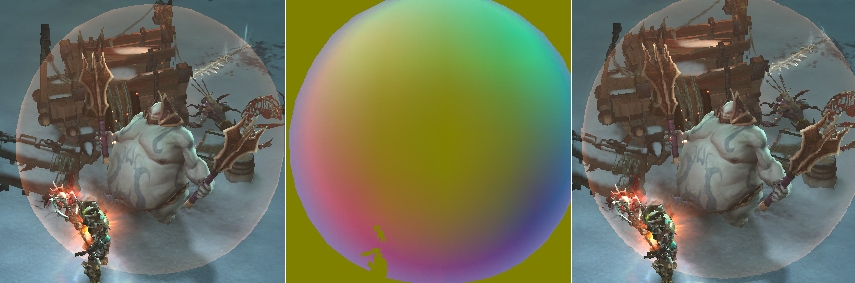
Distortion follows the classic approach. Particles responsible for image distortion (for example, hot air) are rendered into a dedicated texture. The stored values represent U and V texture-coordinate offsets. During the following fullscreen pass, these offsets are applied when sampling the main scene image.
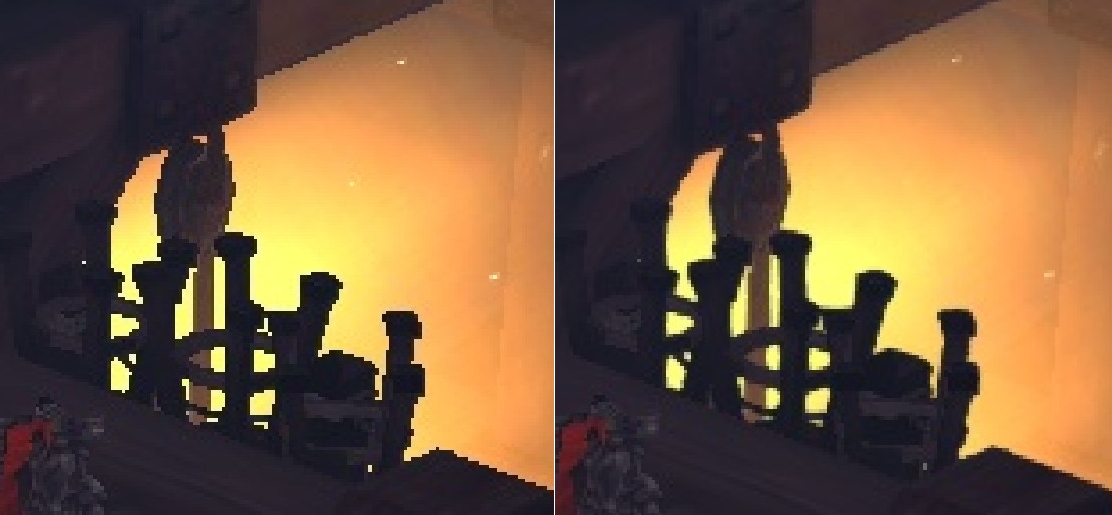
Fullscreen anti-aliasing is also implemented as a post-process effect. There are several reasons for this decision. Using an INTZ depth buffer becomes problematic together with traditional multisampling. A clean multisampled INTZ depth buffer cannot be created and later copied into a non-multisampled INTZ texture. Additionally, shadow maps would consume enormous amounts of memory. Remember that their format is:
A32B32G32R32F
or 16 bytes per pixel. The game therefore uses Fast Approximate Anti-Aliasing (FXAA).
Geometry and Materials
All vertex data for game models is packed into a cache-friendly 32-byte format. The exception is animated models, which use 48 bytes. The additional data consists of:
- bone weights
- bone indices
The game uses skeletal animation performed directly in the shader. Because of this, animated models are limited to seven point lights. The reason is the shortage of constant registers required to store both lighting parameters and bone matrices. The total number of draw calls is fairly small. Typical values range between:
300–800 DIP calls
which is an excellent result. The shaders are built using an uber-shader approach. In other words, many variations of the same effect are generated by compiling the shader multiple times using different preprocessor defines. For example, an effect may exist:
- with fog or without fog,
- with shadows or without shadows,
- with lightmaps or without lightmaps.
A particular feature is controlled by a define such as:
#define USE_FOG 1
The corresponding shader code is wrapped inside:
#if USE_FOG
...
#endif
By switching USE_FOG between 0 and 1, we obtain shader variants with and without fog. The same approach is used for all other effects. The shader build system automatically iterates through every valid combination of defines and compiles all required shader variants.
User Interface
The in-game interface is rendered in a fairly conventional manner. No particularly aggressive batching aimed at reducing DIP calls was observed. One thing worth mentioning is text rendering. Character preparation is very similar to the technique used by Scaleform GFX. All unique glyphs are first rendered into a texture atlas. This texture is then used when rendering text. Despite the similarity of the approach, Scaleform itself is not used.
Afterword
The renderer leaves a very positive impression. It's a mix of old-school techniques and a few modern trends. Performance is excellent while still producing beautiful visuals. As is usually the case with Blizzard games. A huge part of that visual quality comes from the work of artists and designers. Diablo III once again proves that beautiful graphics can be achieved even without the most technologically advanced renderer.
Useful Links
- Variance Shadow Maps. www.punkuser.net/vsm
- FXAA. https://developer.download.nvidia.com/assets/gamedev/files/sdk/11/FXAA_WhitePaper.pdf
- List of known GPU "hacks". https://aras-p.info/texts/D3D9GPUHacks.html