GPU Bound. Part Two. Endless Forest.
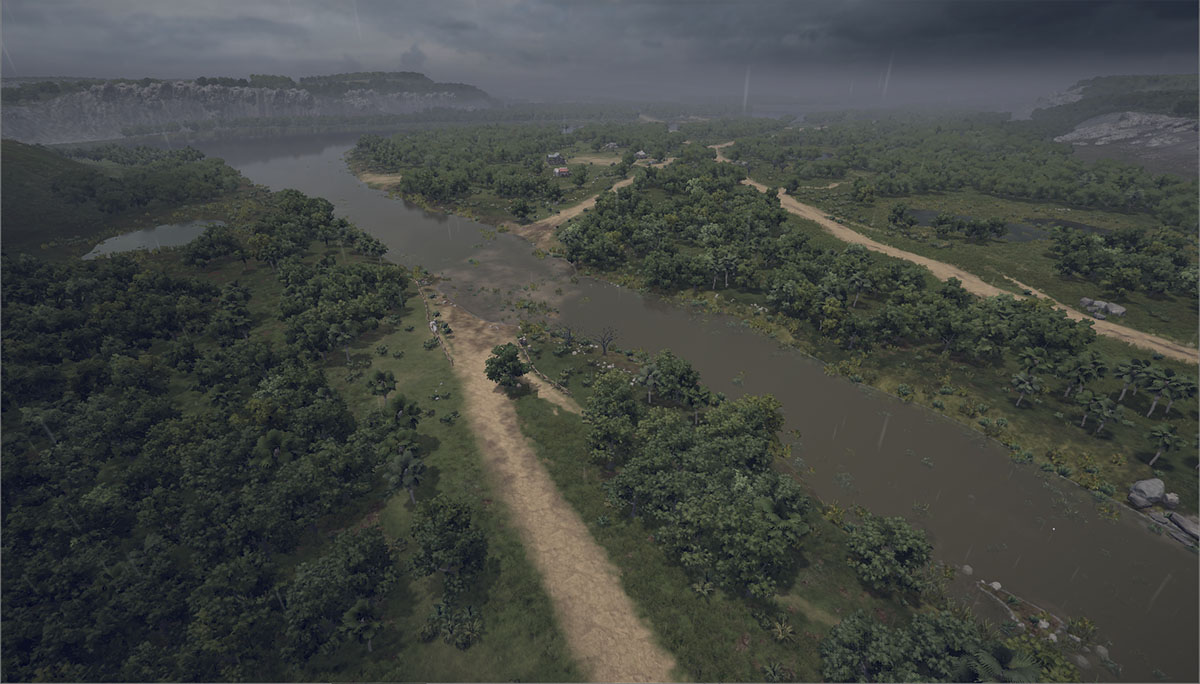
Almost every game needs to fill its levels with objects that create visual richness, beauty, and variety in the virtual world. Take any open-world game. Trees, grass, terrain, and water are the primary "fillers" of the image. This time there will be very little GPGPU, but I'll try to explain how to render huge numbers of trees and rocks when you technically can't—but really want to.
Right away, it's worth mentioning that we're a small indie development studio, and we simply don't have the resources to hand-craft every little detail. That naturally leads to a requirement for various subsystems to function as extensions on top of the engine's existing functionality. That's how things worked in the first article of this series about animations (where we accelerated Unity's existing animation system), and that's how they'll work here as well. This greatly simplifies the integration of new functionality into a project (less learning, fewer bugs, etc.).
So, the task: we need to render a lot of forest. Our game is a real-time strategy (RTS) with huge maps (30×30 km), which defines the main requirements for the rendering system:
- Using the minimap, the player can instantly jump to any point on the map. Data for the new location must already be available. Unlike FPS or TPS games, we can't rely on delayed resource streaming.
- Levels of this size require truly enormous numbers of objects. Hundreds of thousands, if not millions.
- Large maps also make manual placement of forests extremely time-consuming and difficult. We need procedural generation of forests, rocks, and bushes, while still allowing level designers to manually adjust and place objects in key areas.
How can we solve such a problem? Unity certainly won't handle this many ordinary scene objects. We'll die from culling and batching overhead. Rendering itself can be handled through instancing, but then we need our own management system. Trees need to be modeled. Tree animation systems need to be implemented. Ugh. We want something beautiful and available immediately. There's SpeedTree, but it has no animation API, billboard rendering from a top-down view looks awful because there are no horizontal billboards, and the documentation is... somewhat sparse. But when has that ever stopped us? Let's optimize SpeedTree rendering.
Rendering
First, let's see whether ordinary SpeedTree objects are really that bad:
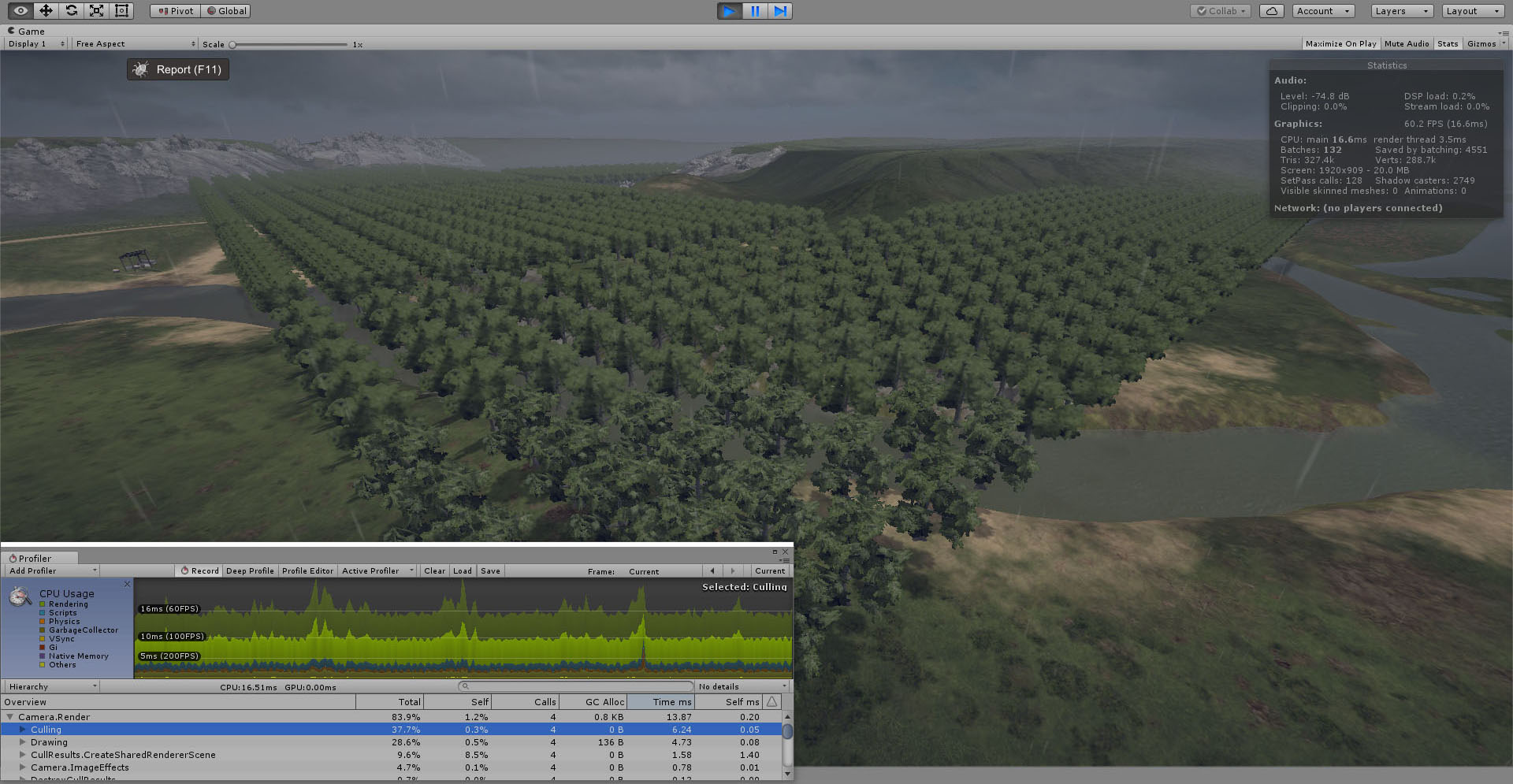
Here we have about 2,000 trees in the scene. Rendering itself is fine. Instancing combines the trees into batches. The CPU side, however, is a disaster. Half of the camera render time is spent on culling. And we need hundreds of thousands of trees. Clearly we must abandon GameObjects, but that means we now need to dissect the internal structure of SpeedTree models, understand their LOD switching mechanism, and reimplement everything ourselves.
A SpeedTree model consists of several LOD levels (typically four), where the final LOD is a billboard and all others are geometric meshes with different levels of detail. Each LOD consists of multiple submeshes, each using its own material:
This isn't unique to SpeedTree. Any complex object can have this structure. LOD switching supports two modes:
- Cross Fade:
- SpeedTree:
CrossFade (represented in Unity shaders by the LOD_FADE_CROSSFADE preprocessor define) is the standard LOD transition method for any scene object with multiple detail levels. Instead of instantly disappearing when a LOD switch occurs—which would create a very obvious pop—the outgoing mesh gradually dissolves using dithering. A simple effect, but it avoids requiring true transparency (alpha blending). The incoming mesh appears in exactly the same way.
SpeedTree (LOD_FADE_PERCENTAGE) is specifically designed for trees. In addition to the usual vertex coordinates, the geometry stores the positions of corresponding vertices from the next lower-detail LOD. The transition value between LODs becomes the interpolation weight used to blend between these positions. Transitions to and from billboard mode still use the CrossFade technique. In practice, that's all we need to know to implement our own LOD switching system. The rendering itself is straightforward. We iterate through:
- all tree types,
- all LOD levels,
- all submeshes within each LOD.
For each combination, we bind the corresponding material and render all instances using instancing. As a result, the number of draw calls becomes equal to the number of unique object types in the scene. But how do we know what to render? For that we'll need a...
Forest Generator
The actual planting process is simple and straightforward. For each tree type, we divide the world into cells large enough to contain a single tree. We then iterate through all cells and check a mask like this:
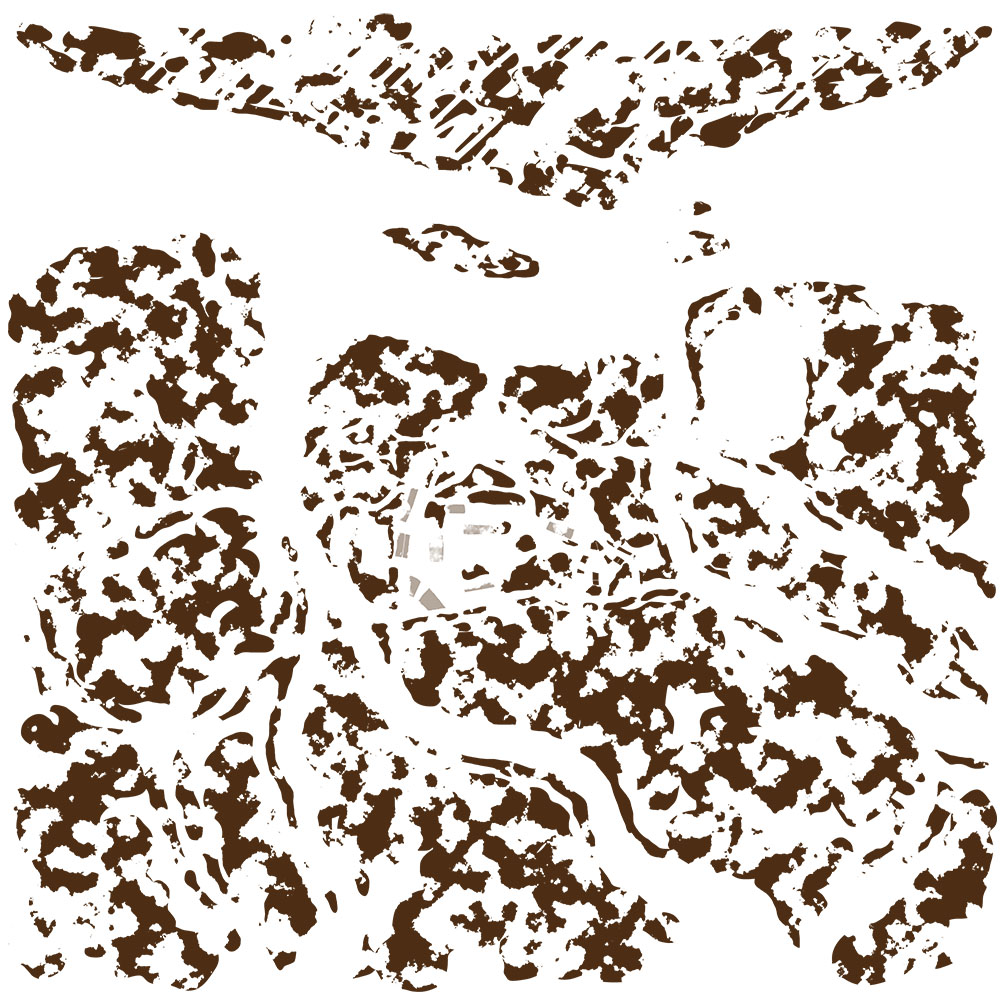
at the corresponding location. Can a tree be planted here or not? The mask defining forested areas is painted by the level designer. Initially all of this was implemented on the CPU in C#. The generator worked... slowly. As level sizes continued growing, waiting tens of minutes for regeneration became increasingly painful. The obvious solution was to move the generator to the GPU using compute shaders. The implementation is simple. We need:
- a terrain heightmap
- a tree-placement mask
- an
AppendStructuredBufferused to store generated trees
Each generated entry contains only:
- position
- tree type ID
That's all the information we need. Trees manually placed in important gameplay locations are collected by a special script, added to the shared arrays, and the original scene objects are removed.
Culling & LOD Switching
Knowing the position and type of every tree is not enough to render efficiently. Every frame we must determine:
- which objects are visible
- which LOD should be rendered
- how LOD transition logic should be evaluated
A dedicated compute shader handles this work as well. For every object we first perform Frustum Culling:
If the object is visible, LOD switching logic is evaluated. Based on the object's screen-space size we determine the desired LOD level. If the LOD group uses the CrossFade mode, we increment the transition timer used by dithering. If SpeedTree Percentage mode is enabled, we compute the normalized transition value between LOD levels. Modern graphics APIs provide wonderful functionality that allows draw-submission information to be supplied through GPU buffers.
For example:
ID3D11DeviceContext::DrawIndexedInstancedIndirect
in Direct3D 11. This means the draw-argument buffer can be generated entirely on the GPU. As a result, we can create a rendering system that is completely independent of the CPU. (Well, except for calling Graphics.DrawMeshInstancedIndirect.) In our case, we only need to write the instance count for each submesh. Everything else:
- index count,
- mesh offsets,
is static. The indirect-argument buffer is divided into sections. Each section corresponds to a draw call for a particular submesh. Inside the compute shader, whenever a mesh should be rendered during the current frame, we increment the corresponding InstanceCount value. This is what it looks like in action:
GPU occlusion culling is the obvious next step. However, for an RTS camera and relatively flat terrain, the benefits are less obvious. (For interested readers, see here and here.) I simply haven't implemented it yet. To make everything render correctly, the SpeedTree shaders require minor modifications so they can fetch positions and LOD-transition values from the corresponding compute buffers. At this point we have beautiful but completely static trees. Real SpeedTree assets, however, react to wind and animate naturally. All of that logic resides inside:
SpeedTreeWind.cginc
Unfortunately, Unity provides neither documentation nor access to the internal parameters.
CBUFFER_START(SpeedTreeWind)
    float4 _ST_WindVector;
    float4 _ST_WindGlobal;
    float4 _ST_WindBranch;
    float4 _ST_WindBranchTwitch;
    float4 _ST_WindBranchWhip;
    float4 _ST_WindBranchAnchor;
    float4 _ST_WindBranchAdherences;
    float4 _ST_WindTurbulences;
    float4 _ST_WindLeaf1Ripple;
    float4 _ST_WindLeaf1Tumble;
    float4 _ST_WindLeaf1Twitch;
    float4 _ST_WindLeaf2Ripple;
    float4 _ST_WindLeaf2Tumble;
    float4 _ST_WindLeaf2Twitch;
    float4 _ST_WindFrondRipple;
    float4 _ST_WindAnimation;
CBUFFER_END
How do we extract those values? For each tree type we render an original SpeedTree object somewhere inconspicuous. More precisely: visible to Unity, but invisible to the camera. Otherwise Unity stops updating the wind parameters. This can be achieved by greatly enlarging the object's bounding box and placing it behind the camera. Every frame we retrieve the required values using:
material.GetVector(...)
Now the trees sway in the wind. Unfortunately, top-down billboard rendering still looks depressing:
With the BILLBOARD_FACE_CAMERA_POS shader variant things become even worse:
We need horizontal (top-down) billboards. This has been a standard SpeedTree feature since forever. Judging by the forum discussions, however, Unity still doesn't support it. As one post on the official SpeedTree forum puts it:
"The Unity integration never used the horizontal billboard."
Looks like we'll have to implement it ourselves. The geometry itself is easy. The real question is: how do we determine the sprite UV coordinates inside the billboard atlas?
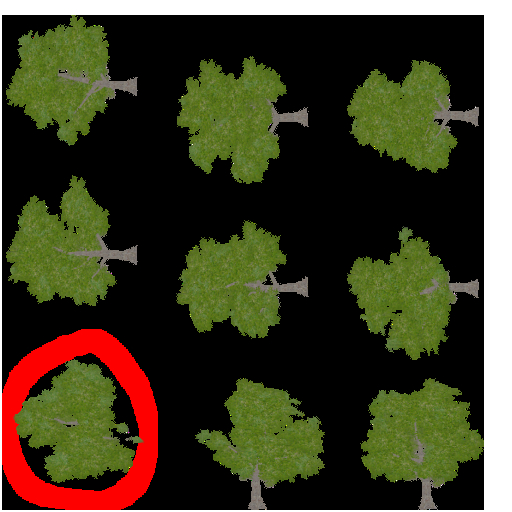
We dust off the old SpeedTreeRT SDK and discover the following structure in the documentation:
struct SBillboard
{
    bool            m_bIsActive;
    const float*    m_pTexCoords;
    const float*    m_pCoords;
    float           m_fAlphaTestValue;
};
The documentation states:
"m_pTexCoords points to a set of 4 (s,t) texture coordinates that define the images used on the billboard. m_pTexCoords contains 8 entries."
Interesting. Let's search the binary .spm file for four floating-point values within the range [0..1]. After some scientific trial-and-error, it turns out the desired sequence appears immediately before a block of 12 floats whose signs follow the pattern:
float signs[] =
{
    -1, 1,
    -1, 1,
     1, -1,
     1, 1,
     1, -1,
     1, 1
};
A small C++ console utility later, and we can process all .spm files automatically to extract UV coordinates for horizontal billboards. The resulting CSV file looks something like:
Azalea_Desktop.spm: 0, 1, 0.333333, 1, 0.333333, 0.666667, 0, 0.666667
...
When creating horizontal billboard geometry, we simply locate the appropriate record and assign the extracted UV coordinates. Now things look like this:
Still not great. Let's fade the vertical billboard using the alpha-test threshold based on the viewing angle:
Results
Here's a profiler that displays both dynamic statistics (how much is currently being rendered) and static statistics (how many objects exist in the scene and their parameters):
And finally, a nice showcase video. (The second half demonstrates switching between quality levels.)
So what do we end up with?
- A completely CPU-independent system.
- Fast performance.
- Uses existing SpeedTree assets that can be purchased online.
- Naturally, I made it work with arbitrary
LODGroups, not just SpeedTree. So now we can render huge numbers of rocks as well.
As for the drawbacks:
- No occlusion culling.
- Billboards are still not particularly impressive.
Still, for a large-scale RTS with maps measuring tens of kilometers across, the results are more than satisfactory. The most important achievement wasn't the rendering itself. It was removing all per-object CPU overhead. No GameObjects. No Unity culling. No Unity LOD processing. No per-instance management. Just:
- GPU-generated forests,
- GPU culling,
- GPU LOD selection,
- GPU-generated indirect draw arguments,
- GPU instanced rendering.
Exactly the kind of approach that makes rendering hundreds of thousands—or even millions—of objects feasible. And that's really the main idea behind the entire GPU Bound series: If the CPU becomes the bottleneck, stop feeding it work. Move the work somewhere else.